Accessibility Service Transparency
Understanding why we need it and how we protect you.
🛡️ Why we need this permission
FocuzPass is a productivity tool, not a monitoring app. To help you stay disciplined, the Accessibility Service is used for one specific purpose:
It is used to block distracting apps in real-time and immediately send you back to the home screen if you haven't completed your required focus task.
Without this permission, the app cannot detect when a forbidden app is opened and therefore cannot protect your focus.
🛡️ How exactly is it safe?
Your privacy is our priority. Our implementation is "Read-Only" for package names, not content:
- No Data Collection: We DO NOT read your texts, emails, or passwords.
- Real-Time Only: We only detect the *event* of an app opening to decide if we should send you to the home screen.
- Zero Logs: Your private app usage data stays on your device.
⚠️ Understanding the "Danger" Warning
On some devices (like Xiaomi, POCO, or Redmi), you may see a high-alert warning that looks like this:
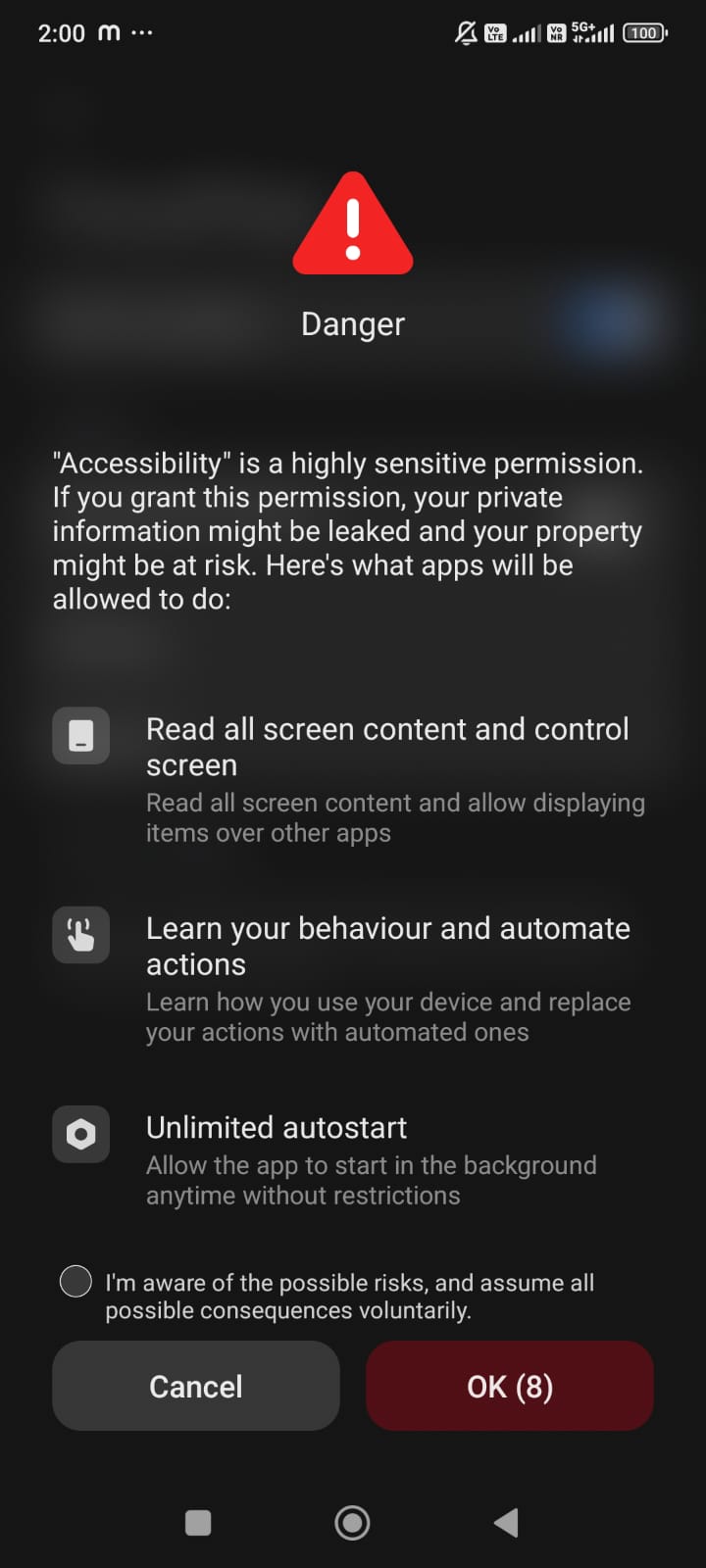
Why does this appear? This is a standard system warning that only appears on some specific device models (like those running MIUI) to ensure you trust the app. Most Android devices do not show this specific "Danger" message. FocuzPass only uses the "Window State" permission to perform the blocking—it does not "analyse your behaviour" or "leak property."
You can safely check the box and proceed knowing that FocuzPass is committed to your safety.
💡 Our Commitment
FocuzPass is built to empower you, not to monitor you. Our business model is based on subscriptions, not on selling data. Your trust is our most valuable asset.